
Introduction
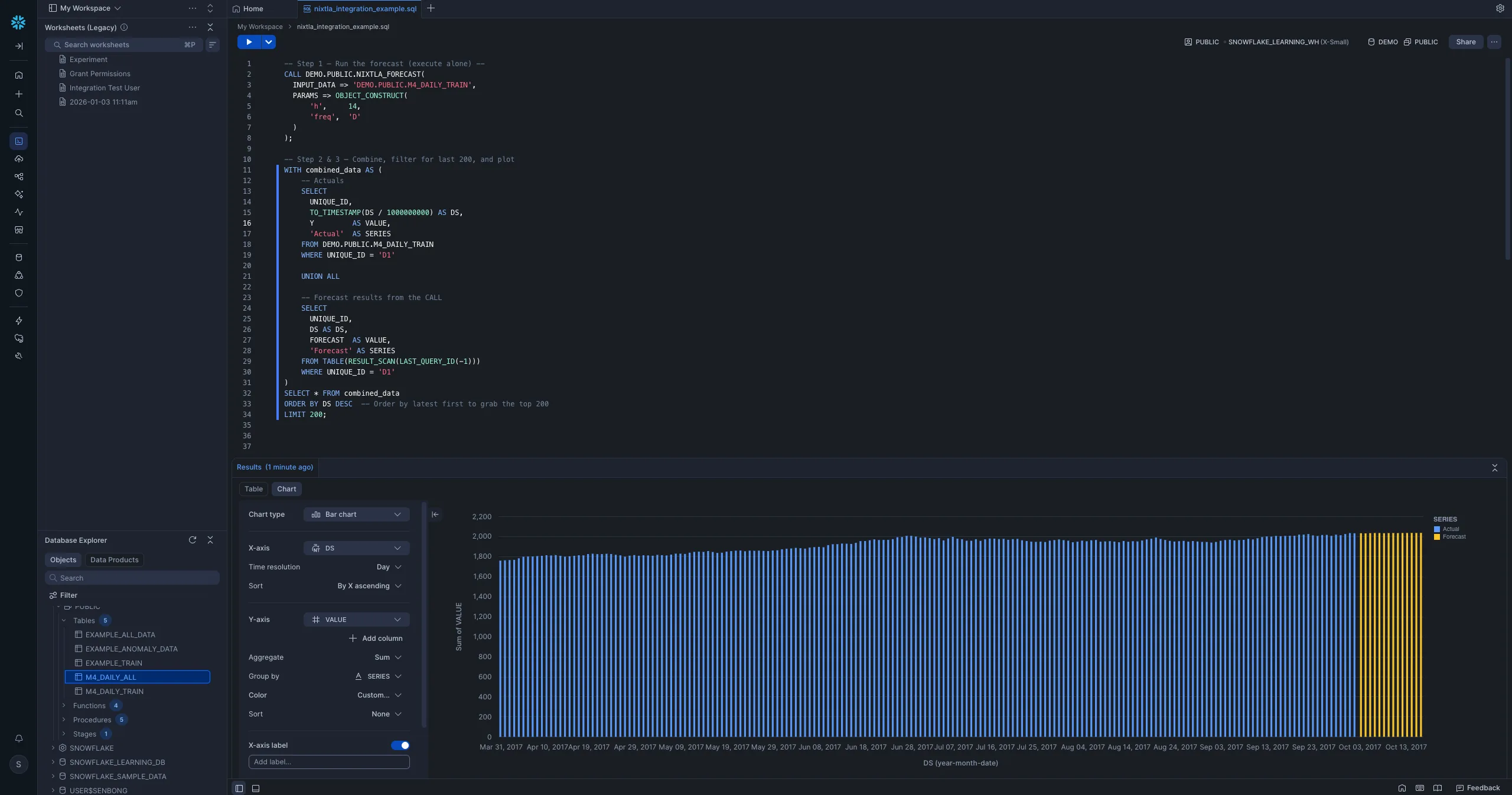
Last year, we showed you how TimeGPT could replace Snowflake's native forecasting, delivering 50x faster runtimes and better accuracy with a single SQL call.
Today, we're taking it further. The Snowflake integration is now officially part of the nixtla Python package, and it ships with five stored procedures: forecasting, anomaly detection, SHAP based explainability, evaluation, and finetuning, all inside your Snowflake environment.
What's New
The previous integration focused on NIXTLA_FORECAST. You can now run the full TimeGPT suite directly in Snowflake:
| Procedure | What it does |
|---|---|
NIXTLA_FORECAST | Zero shot time series forecasting |
NIXTLA_DETECT_ANOMALIES | Flag anomalous observations with confidence bounds |
NIXTLA_EXPLAIN | Return SHAP based feature contributions |
NIXTLA_EVALUATE | Compute MAPE, MAE, MSE across your series |
NIXTLA_FINETUNE | Finetune the model on your historical data; returns a finetune model ID (Python stored procedure) |
And installation is now a single command after pip install nixtla[snowflake]:
python -m nixtla.scripts.snowflake_install_nixtla \
    --database MY_DB \
    --schema MY_SCHEMA \
    --stage_path MY_STAGE \
    --base_url https://api.nixtla.io
The script guides you interactively through each step: packaging, uploading to your Snowflake stage, creating network rules, storing your API key in Snowflake Secrets, and registering all procedures. Set NIXTLA_API_KEY in your environment beforehand and the script will pick it up automatically. The script connects to Snowflake using a connection named "default" from ~/.snowflake/config.toml; pass --connection_name YOUR_CONNECTION if yours is named differently.
Anomaly Detection in SQL
Detecting anomalies across thousands of time series used to require exporting data, running a Python script, and reimporting results. Now it's one SQL call:
CALL MY_DB.MY_SCHEMA.NIXTLA_DETECT_ANOMALIES(
    INPUT_DATA => 'MY_DB.MY_SCHEMA.SALES_DATA',
    PARAMS => OBJECT_CONSTRUCT(
        'level', 95,
        'freq', 'D'
    )
);
Results come back as a table with unique_id, ds, y, the model's prediction (TimeGPT), an anomaly flag ("True" or "False"), and confidence bounds (TimeGPT_lo, TimeGPT_hi). No Python. No data movement.
Forecasting with Confidence Intervals
The forecast procedure supports exogenous variables and confidence levels:
CALL MY_DB.MY_SCHEMA.NIXTLA_FORECAST(
    INPUT_DATA => 'MY_DB.MY_SCHEMA.DEMAND_DATA',
    PARAMS => OBJECT_CONSTRUCT(
        'h', 14,
        'freq', 'D',
        'level', ARRAY_CONSTRUCT(80, 95)
    )
);
Confidence intervals are returned as a VARIANT column, so you can unpack whichever level your downstream dashboard needs.
Explainability with SHAP
When you pass exogenous variables (promotions, holidays, price changes), NIXTLA_EXPLAIN tells you how much each feature contributed to the forecast:
CALL MY_DB.MY_SCHEMA.NIXTLA_EXPLAIN(
    INPUT_DATA => 'MY_DB.MY_SCHEMA.SALES_WITH_FEATURES',
    PARAMS => OBJECT_CONSTRUCT(
        'h', 14,
        'futr_exog_list', ARRAY_CONSTRUCT('promotion', 'is_holiday')
    )
);
Results are in long format, one row per (unique_id, ds, feature), with a forecast value and a contribution value. Plugs directly into any BI tool.
Evaluation
Measure forecast accuracy without leaving Snowflake:
CALL MY_DB.MY_SCHEMA.NIXTLA_EVALUATE(
    INPUT_DATA => 'MY_DB.MY_SCHEMA.HISTORICAL_DATA',
    METRICS => ARRAY_CONSTRUCT('MAPE', 'MAE', 'MSE')
);
Returns a row per (unique_id, forecaster, metric, value), making it easy to identify which series are hardest to forecast and where finetuning would help most.
Why Run This Inside Snowflake?
No third party orchestration layer. Your series are sent to the Nixtla API for inference, but that call is made directly from Snowflake's compute layer over a secured network rule you control, using an API key stored in Snowflake Secrets. There is no intermediate pipeline, export step, or extra system holding a copy of your data, which keeps the governance surface to a single, auditable egress path. If your requirements rule out sending data outside your own infrastructure entirely, TimeGPT is also available as a self hosted, on premise deployment, talk to us about it.
Scales automatically. Behind each procedure, Snowflake distributes the work across partitions using UDTFs. Thousands of series are processed in parallel using Snowflake's own resource management, no cluster to configure.
SQL first teams can own it. Analysts, BI engineers, and data teams can run TimeGPT without writing a line of Python.
Getting Started
- Install nixtla:
pip install nixtla[snowflake] - Set your API key:
export NIXTLA_API_KEY=your_key_here - Run the setup script. Guided prompts walk you through each component (security integration, package upload, UDTFs, stored procedures, and example datasets)
- Call SQL procedures from any interface: Snowflake's worksheet, dbt, or your BI tool
Full documentation is included in the nixtla package on PyPI.
Conclusion
TimeGPT's Snowflake integration has graduated from a standalone tool to a first class part of the nixtla SDK. Whether you need fast zero shot forecasting, anomaly detection for operational monitoring, or SHAP based explainability for stakeholder reporting, setup is a single pip install away, and everything after that is executed from SQL in your existing Snowflake environment.